

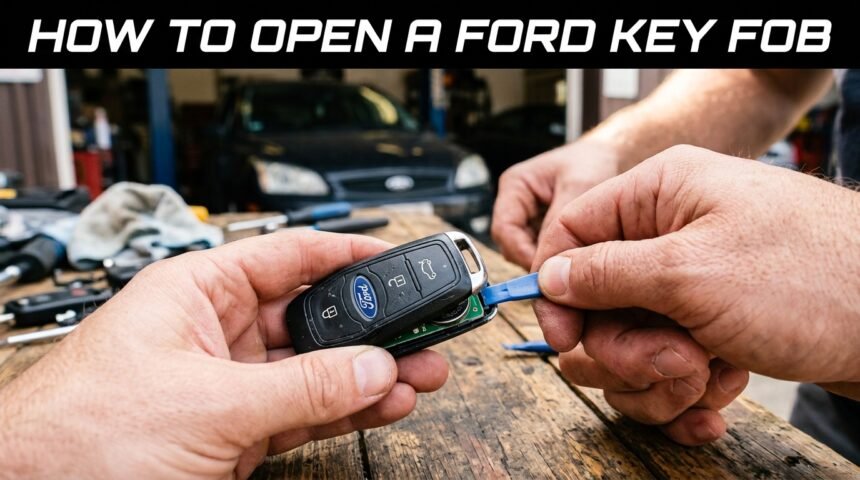
Many Ford owners eventually need to know how to open a Ford key fob, usually because the battery has died or a button has stopped responding. The process is simpler than it looks and does not require any special training or expensive tools.
With a small flathead screwdriver or a coin, most people can open their fob in under two minutes. This guide walks through every part of the process in plain language, from identifying your fob type to safely putting it back together so it works exactly as before.
Why You Might Need to Open Your Ford Key Fob
There are a few common situations that lead drivers to search for how to open a Ford key fob. The most frequent reason is a weak or dead battery, but sticky buttons and a broken emergency key blade are also common triggers.
Common Reasons: Battery Replacement, Broken Key, Stuck Buttons
A dying battery is the single most common reason people open their fob, since Ford fobs typically signal weaker range or slower response before failing completely.
Sometimes the plastic casing cracks or the metal emergency key gets stuck inside, which also requires opening the shell. Buttons can also become unresponsive due to dust or moisture trapped underneath them.
Tools You’ll Need Before Starting
Before opening the fob, gather a small flathead screwdriver, a coin as a backup option, and the correct replacement battery for your model.
A soft cloth or plastic pry tool is helpful for avoiding scratches on the casing. Having everything ready beforehand makes the process faster and reduces the risk of losing small internal parts.
Understanding Your Ford Key Fob Type
Ford uses a few different fob designs across its lineup, and the opening method can vary slightly depending on which one you own. Knowing your fob type in advance makes the rest of the process much smoother.
Standard Remote Key Fobs
Standard Ford remotes usually have a simple two-piece plastic shell held together by small clips. These are the easiest type to open since the seam is often visible along the edge. Most older Ford models such as the Focus or older Fiesta use this basic design.
Smart Keys / Proximity Keys
Smart or proximity keys are used in newer Ford models and often have a more complex internal layout with additional sensors. These fobs may require slightly more care since the internal antenna sits close to the casing. The opening method is similar, but extra gentleness is recommended.
Key Fobs with Flip-Out Blades
Many Ford fobs include a metal blade that flips out for manual door entry. This blade usually needs to be removed first, since a small button beside it often doubles as the opening mechanism. Once the blade slides out, the seam beneath it becomes visible.
Identifying Your Fob Model (by Ford vehicle year/model)
Ford fob designs differ between models like the F-150, Escape, Explorer, and Mustang, so checking your owner’s manual or the fob’s back label can confirm the exact type.
Newer models after 2018 generally use smart key designs, while older ones stick to standard remotes. Identifying this correctly prevents unnecessary force during opening.
Safety Precautions Before Opening
Taking a few precautions before opening the fob helps protect both the internal electronics and the outer casing. This step is often skipped but can prevent costly mistakes.
Working on a Clean, Static-Free Surface
Static electricity can potentially damage the small circuit board inside the fob, so working on a clean table away from carpets is recommended. A flat surface also prevents small screws or clips from rolling away and getting lost. This simple step saves time later during reassembly.
Avoiding Damage to Internal Circuit Board
The circuit board inside the fob is delicate, so avoid touching it directly with bare hands or metal tools. Applying too much pressure while prying can bend or crack the board permanently. Gentle, steady movements are always safer than quick forceful ones.
Handling the Battery Safely
Old batteries should be handled carefully and disposed of properly, since they can leak if damaged. Avoid placing them near heat sources or attempting to puncture the casing. Keeping batteries away from children and pets during replacement is also important.
Tools Required
Having the right tools ready before starting makes opening a Ford key fob quick and mistake-free. Below is a simple table summarizing what is typically needed.
| Tool | Purpose |
| Small flathead screwdriver | Used to pry open the seam of the fob |
| Coin | Alternative tool if a screwdriver isn’t available |
| Replacement battery (CR2032/CR2025) | Powers the fob after reassembly |
| Plastic pry tool (optional) | Prevents scratches on the casing |
Flathead Screwdriver (Small)
A small flathead screwdriver is the most reliable tool for separating the two halves of the fob casing. It fits into narrow seams without causing major damage if used gently. Choosing a smaller size reduces the risk of scratching the plastic shell.
Coin (Alternative Tool)
A coin can be used in place of a screwdriver when one isn’t available, especially for standard remote-style fobs. It works by sliding into the seam and gently twisting to create separation. This method is slightly less precise but still effective for most models.
Replacement Battery (CR2032/CR2025 — confirm model)
Ford fobs commonly use either CR2032 or CR2025 batteries, though the exact type should always be confirmed on the old battery or in the manual.
Using the wrong battery size can prevent the fob from closing properly. Keeping a spare battery at home is a convenient habit for future replacements.
Plastic Pry Tool (Optional, to avoid scratches)
A plastic pry tool is a safer alternative to metal tools since it reduces the chance of visible scratches on the fob’s surface. It is especially useful for smart keys with a glossy or painted finish. While optional, it gives a cleaner final result.
Step-by-Step Guide to Opening the Fob
This is the core part of the process where the fob is physically opened. Each step should be done slowly to avoid damaging the clips or internal components.
Step 1: Remove the Metal Emergency Key Blade
Most Ford fobs have a small release button or slider near the metal blade that allows it to be pulled out. Removing this blade first exposes the small notch used for prying the casing open. Skipping this step can make the next stage more difficult.
Step 2: Locate the Seam or Notch
Once the blade is removed, a thin seam or notch becomes visible along the edge of the fob. This is the exact point where the screwdriver or coin should be inserted. Taking a moment to inspect this area prevents accidental slipping later.
Step 3: Insert and Twist the Flathead Screwdriver
Gently insert the screwdriver into the seam and twist slowly rather than forcing it open quickly. A slow, controlled twist allows the internal clips to release without snapping. Rushing this step is the most common reason fobs crack during opening.
Step 4: Separate the Two Halves Gently
After the clips release, the two halves of the fob should separate with light pressure. Pulling too hard at this stage can damage wires connecting the button pad to the circuit board. A steady, even pull works best.
Step 5: Access the Battery Compartment
Once open, the battery compartment becomes clearly visible, usually held by a small plastic tab. This is the point where the old battery can be removed and inspected. Confirming the battery size here avoids buying the wrong replacement.
Replacing the Battery
Replacing the battery correctly is just as important as opening the fob itself, since incorrect placement can prevent it from working. This section covers the key details to get it right the first time.
Identifying Correct Battery Type
Checking the printed numbers on the old battery is the easiest way to confirm the correct replacement type. Most Ford fobs use CR2032, though some older models use CR2025. Buying the wrong size can cause the fob to sit loosely or not close properly.
Correct Polarity Placement (+/-)
The positive side of the battery, marked with a plus sign, should generally face upward unless the compartment indicates otherwise. Incorrect polarity is one of the most common reasons a fob fails to work after reassembly. Double-checking against the old battery’s position avoids this mistake.
Common Mistakes to Avoid
Touching the battery’s flat surfaces with bare fingers can leave oily residue that affects contact points. Forcing a battery that doesn’t fit properly can also damage the compartment’s small metal clips. Taking a few extra seconds to confirm size and orientation prevents most issues.
Reassembling the Key Fob
Putting the fob back together correctly ensures it continues to function smoothly and looks clean afterward. This part is usually quicker than opening it.
Aligning the Two Halves
Before pressing the halves together, check that the button pad and circuit board are sitting in their original position. Misalignment at this stage can cause buttons to feel stiff or unresponsive. A quick visual check saves time later.
Snapping the Case Shut Securely
Press around the edges evenly until each clip clicks back into place. Uneven pressure can leave small gaps that make the fob feel loose. Listening for the clicking sound helps confirm a secure closure.
Reinserting the Metal Key Blade
Once the case is closed, slide the metal blade back into its slot until it locks with a light click. This step restores the fob’s manual entry function. Testing the slide-out mechanism afterward confirms it is working correctly.
Testing the Key Fob After Reassembly
Testing the fob immediately after closing it helps confirm everything was done correctly. This step only takes a few seconds but prevents surprises later.
Checking Lock/Unlock Function
Standing near the vehicle, pressing the lock and unlock buttons should trigger an immediate response. If nothing happens, checking the battery orientation is usually the first troubleshooting step. A working response confirms the reassembly was successful.
Re-Syncing the Fob (If Needed)
In rare cases, the fob may need to be re-synced with the vehicle using the ignition cycle method described in the owner’s manual. This typically involves turning the key or ignition on and off in a specific sequence. Re-syncing is usually only needed after a battery replacement on certain smart key models.
Troubleshooting If It Doesn’t Work
If the fob still doesn’t respond, reopening it to check battery placement is the next logical step. Sometimes a battery that looks new is actually defective and needs replacing again. Testing with a multimeter can confirm if the battery is truly providing power.
Common Problems & Fixes
A few recurring issues come up after learning how to open a Ford key fob, and most have simple solutions.
| Problem | Likely Fix |
| Fob won’t open easily | Recheck seam location and apply gentle, steady pressure |
| Buttons stop working after reassembly | Ensure button pad is aligned correctly with the board |
| Fob not syncing with car | Follow manual re-sync steps or replace battery again |
Fob Won’t Open Easily
If the casing feels stuck, checking for a hidden second clip near the battery compartment often solves the issue. Applying oil-free lubricant lightly on the seam can also help in stubborn cases. Patience prevents unnecessary cracking of the plastic shell.
Buttons Stop Working After Reassembly
This usually happens when the rubber button pad shifts slightly during closing. Reopening the fob and carefully repositioning the pad typically resolves the issue. Ensuring the pad sits flat before snapping the case shut prevents this from happening again.
Fob Not Syncing with Car
If the fob doesn’t sync, checking the vehicle’s manual for the exact re-sync sequence is the most reliable fix. Some models require multiple ignition cycles within a short time frame. If syncing still fails, a dealer visit may be necessary for reprogramming.
When to Seek Professional Help
While opening a Ford key fob at home is usually safe, certain situations call for professional assistance instead of continued DIY attempts.
Signs of Internal Damage
Visible cracks on the circuit board, loose wiring, or a burnt smell are clear signs that professional repair is needed. Continuing to use a damaged fob can lead to complete failure. In these cases, replacement is often more practical than repair.
Dealer vs. Locksmith Options
Ford dealerships offer official programming services, while local locksmiths often provide faster and more affordable alternatives. Both options can handle reprogramming smart keys if syncing issues persist. Choosing between them usually depends on cost and urgency.
Cost Estimates for Replacement
A basic replacement battery costs very little, but a full fob replacement with programming can range significantly depending on the model. Smart keys are generally more expensive to replace than standard remotes. Getting a quote from both a dealer and a locksmith helps compare pricing.
Preventive Maintenance Tips
A few small habits can extend the life of a Ford key fob and reduce how often it needs to be opened.
How Often to Replace the Battery
Most Ford fob batteries last between one and three years depending on usage frequency. Replacing the battery proactively every couple of years can prevent sudden failures. Keeping a spare battery at home makes this easier to manage.
Protecting Your Fob from Water/Drops
Accidental drops in water or onto hard surfaces are common causes of internal damage. Keeping the fob in a pocket or bag rather than loose in a car cup holder reduces this risk. A quick wipe-down after exposure to moisture is also recommended.
Using a Protective Case
A silicone or rubber protective case adds a layer of cushioning against drops and scratches. It also makes the fob easier to grip and less likely to slip out of hand. This small investment can noticeably extend the fob’s lifespan.
Conclusion
Learning how to open a Ford key fob is a practical skill that saves both time and money on simple repairs like battery replacement. With the right tools and a steady hand, the process takes only a few minutes and rarely requires professional help.
Following each step carefully, from removing the blade to testing the fob afterward, ensures a smooth result every time.
FAQs
How do I know my key fob battery is low?
A weaker signal range or a delayed response when pressing buttons usually indicates a low battery. Some newer Ford models also display a low battery warning on the dashboard.
Can I open the fob without a screwdriver?
Yes, a coin or a similar flat object can work as a substitute in most standard fob designs. However, a screwdriver generally offers more control and reduces the risk of slipping.
What if my Ford key fob doesn’t have a visible seam?
Some smart key models hide the seam under the metal blade slot, so removing the blade first usually reveals it. If the seam still isn’t visible, checking the specific model’s guide is recommended before applying force.
Related Articles
Ford Ranger Towing Capacity: Complete Guide
How Long Do Ford Fusions Last? Complete Mileage and Longevity Guide
Does the Ford Edge Have a 3rd Row? Full Seating Guide (2026)
What Is a Ford FE Motor? Complete Guide to History, Specs & Variants
Ford Transit Trail: Complete Guide to Features, Specs and Price